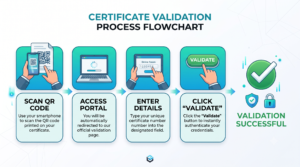
Scan the QR Code: Use your smartphone to scan the QR code printed on your certificate.
Access the Portal: You will be automatically redirected to our official validation page.
Enter Your Details: Type your unique certificate number into the designated field.(CERT-XXXX)
Verify: Click the “Validate” button to instantly authenticate your credentials.